Embedding Model
To train generalizable agents, the main environment elements — nodes, graphs, and vulnerabilities — are encoded into fixed-dimensional, semantically meaningful embeddings using an embedding (static world model). This process is critical to ensure that the agent can generalize across different scenario graphs by leveraging a semantically meaningful embedding space, while avoiding dependencies on the size and ordering of elements through fixed-dimensional embeddings. The embedding model consists mainly of two components:
A Graph Neural Network-based Autoencoder (GAE) for graphs and nodes.
Natural Language Processing (NLP) (in particular Language Models) extractors to represent textual information as meaningful embeddings, and in particular vulnerabilities.
Graph and Node Embeddings
Graph and node embeddings are generated using a GAE comprising Graph Neural Networks (GNNs). To ensure semantic understanding of the graph structure, the GNN is pre-trained using unsupervised learning and then frozen for embedding generation.
The GAE architecture consists of a GNN-based Encoder followed by a simple feed-forward Neural Network Decoder. At each time snapshot, the currently discovered scenario is represented as an evolving visible graph (see Section POMDP Formulation), which serves as input to the agent and hence should be transformed by the embedding model into a proper representation.
Reconstruction Loss Function
The Graph Autoencoder (GAE) is trained in an unsupervised manner using a domain-specific reconstruction loss, designed to guide the encoder in learning meaningful representations of nodes. The total loss function is defined as:
Each component of the loss corresponds to a specific training goal:
Node Feature Reconstruction (\(\sum_{i \in V} \text{Loss}_{\text{node}_i}\)): Encourages the accurate reconstruction of the original node features, so that the embedding preserves the key characteristics of each node.
Edge Feature Reconstruction (\(\sum_{i \in V} \sum_{j \in V} \text{Loss}_{\text{edge}_{ij}}\)): Guides the model to correctly capture the connections and interactions between nodes, representing exploited vulnerabilities, by reconstructing the edge features.
Graph Structure Preservation (\(\text{Loss}_{\text{adj}}(G)\)): Enforces the preservation of the original adjacency structure by penalizing differences between the input and reconstructed graph topology, helping encode the neighborhood context.
Embedding Diversity Regularization (\(\text{Diversity}_{\text{Embeddings}}(V)\)): Prevents the embeddings from collapsing into a single point by encouraging diversity among node representations.
After training, the Decoder is discarded. The remaining Encoder is used to generate meaningful and compact node embeddings for downstream tasks.
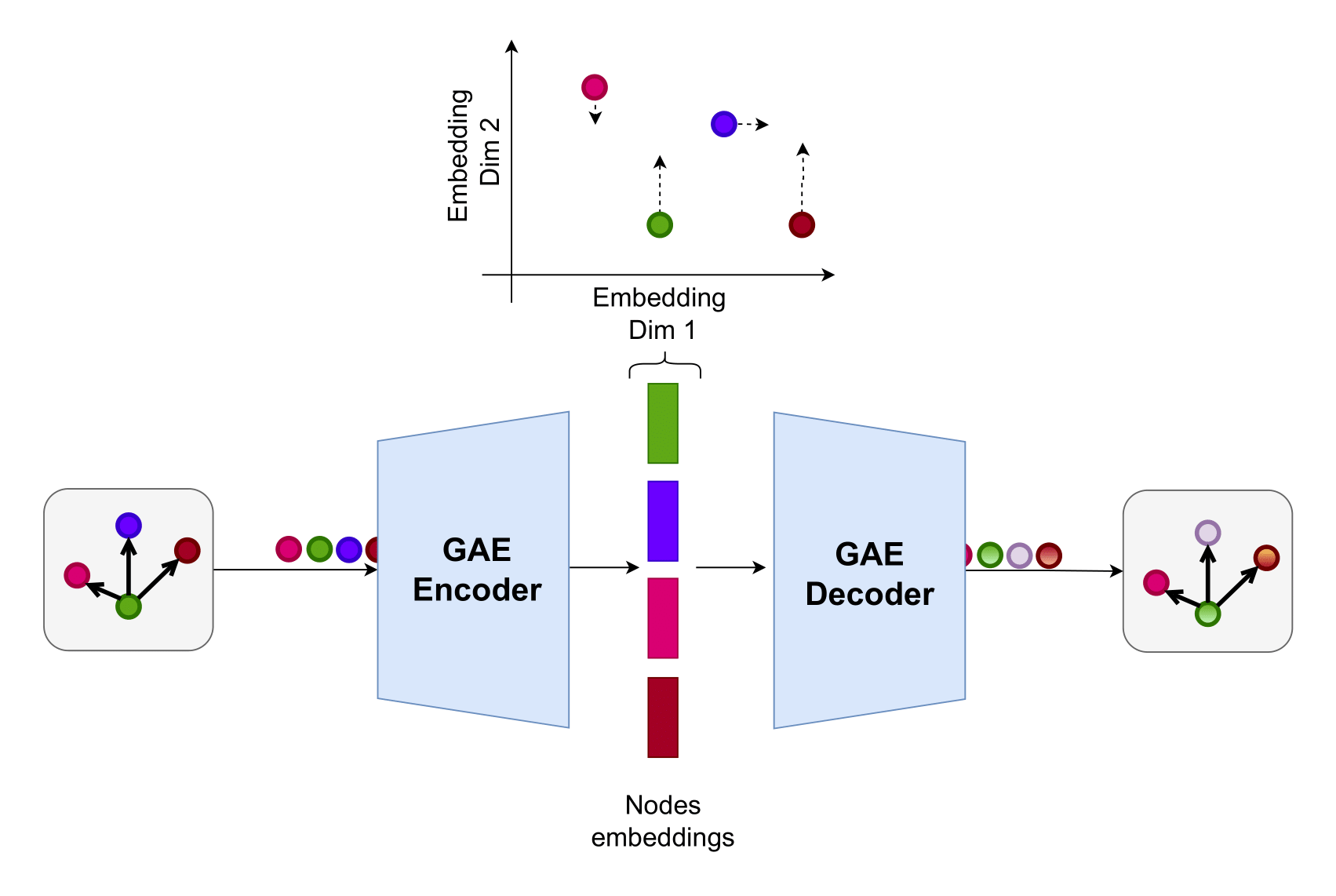
Figure 7 – The GAE is trained to compress the nodes into fixed-dimensional embeddings using an encoder-decoder architecture.
The trained encoder maps each node to an embedding vector \(h_v = \text{Encoder}(v)\). A graph-level embedding can be then computed by aggregating the embeddings of all nodes:
where:
\(\mathbf{h}_G\) is the graph embedding,
\(\mathbf{h}_v\) is the embedding of node \(v\),
\(V\) is the set of all nodes in the graph,
\(\mathrm{AGGREGATE}\) is a permutation-invariant function (e.g., mean pooling) ensuring order invariance.

Figure 8 – The graph embedding is derived by aggregating the node embeddings, capturing the entire graph structure in a fixed-dimensional vector.
GAE Training
To train the GAE model, use the following command:
cd cyberbattle/gae

python3 train_gae.py \
    --name LOGS_FOLDER_NAME \
    --num_runs NUM_RUNS \
    --holdout \
    --load_envs ENVS_FOLDER \
    --nlp_extractors NLP_EXTRACTORS_LIST \
    --load_seeds SEEDS_FILE \ OR
    --random_seeds
– --name specifies the output logs folder name.
- --num_runs sets how many times the model is trained (each time with a different seed).
- The --holdout flag splits scenarios into training and validation sets, allowing evaluation of generalization on unseen graphs.
- --load_envs specifies the folder containing scenario data (if not specified, default scenario set is used).
- --nlp_extractors lists NLP extractors; a separate GAE is trained for each extractor to adapt to varying service and vulnerability embeddings.
- --load_seeds specifies a file with seeds for reproducibility, or --random_seeds can be used to generate random seeds for each run.
Additional configuration options are in cyberbattle/gae/config/train_config.yaml, including architecture details, iteration counts, episode setup, and other hyperparameters.
GAE Logs Folder Structure
Training outputs a logs folder with models, tensorboard logs, and config files for reproducibility, with structure:
.
├── app.log                          # Log for output and errors
├── CySecBERT/                       # Model directory for CySecBERT
│   ├── encoder.pth                  # Encoder state dict
│   ├── events.out.tfevents...       # TensorBoard events file
│   ├── model.pth                    # Full model state dict
│   ├── model_spec.yaml              # Model architecture spec
│   ├── split.yaml                   # Data split info
│   └── train_config_encoder.yaml   # Encoder training config
├── ...                             # Other NLP extractors
├── envs/                           # Scenario environment folder
│   ├── CySecBERT/                  # Scenarios for CySecBERT
│   │   ├── 1.pkl                  # Scenario instance 1
│   │   ├── 2.pkl                  # Scenario instance 2
│   │   └── ...                    # More scenarios
│   └── ...
TensorBoard logs can be visualized by running:
tensorboard --logdir=LOGS_FOLDER_NAME
Open the provided URL in a browser to access the TensorBoard interface.
GAE Hyper-parameters Optimization
GAE hyperparameters can be optimized using the Optuna library, included in the project. Run hyperparameter optimization with:
python3 hyperopt_gae.py \
    ..... \
    --num_trials NUM_TRIALS \
    --optimization_type {grid, random, tpe, cmaes, ...}
--num_trialssets the number of optimization trials.--optimization_typespecifies the search algorithm.
Search ranges for hyperparameters (learning rate, layers, hidden units, etc.) are defined in cyberbattle/gae/config/hyperparams_ranges.yaml.
Optimization minimizes the reconstruction loss on the validation set (or training set if --holdout is not set).
The optimization progress can be monitored via the Optuna database and dashboard:
optuna dashboard --storage sqlite:///cyberbattle/gae/logs/LOGS_FOLDER/gae_hyperopt.db
GAE Integration
A default pre-trained GAE model is provided with the project and can be downloaded using setup.py.
You can retrain the GAE on custom scenario sets and update the specifying a different path in the root config.yaml file.
gae_path: gae_logs_folder_name # relative to cyberbattle/gae/logs
Vulnerability Embeddings
Vulnerabilities are encoded into fixed-dimensional embeddings using pre-trained NLP models, particularly LMs.
The embeddings are generated from the free-text vulnerability descriptions, which include details on the vulnerability and its impact.
Embedding generation occurs live during data scraping (see Section Data Scraping), where vulnerability embeddings are extracted once and stored in the database for later usage.
The specific NLP extractors used for vulnerability embeddings are specified in the --nlp_extractors option of each pipeline stage.
Existing LMs can be further fine-tuned for representation learning on vulnerability data to enhance the quality of the embeddings.